elmah.io changelog

New

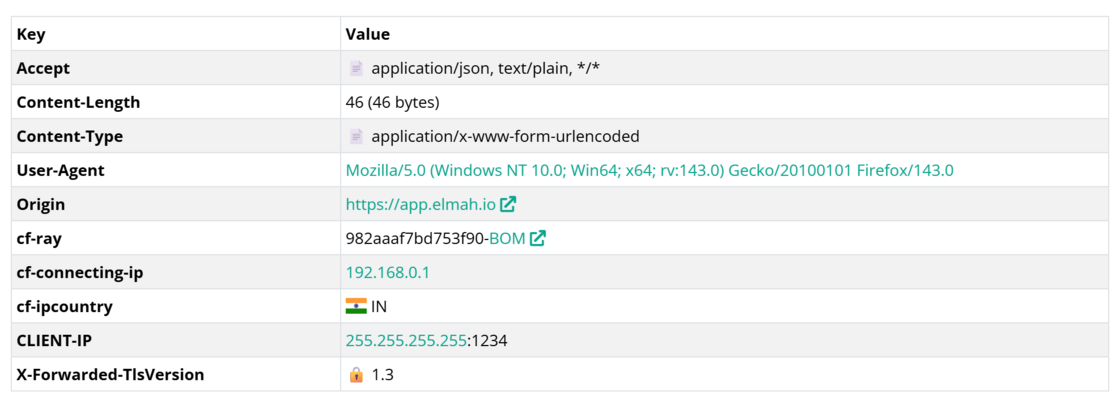
Visualizations on the Server Variables tab

Let’s be honest, looking at the keys and values on the Server Variables tab on the extended log message details is probably not the most exciting part of your day. But with the new visualizers on a range of values, we have tried to make it more helpful and visually appealing.

Emojis are used to represent different content types, byte values show a conversation to kb, mb, etc., user agents, status codes, and IPs are clickable, flags are shown for country codes, warnings are shown on outdated SSL/TLS versions, and more.

Visualizations on the Server Variables tab

Blogged: Demystifying async void in C#: Why It's Dangerous and When It's Okay

https://blog.elmah.io/demystifying-async-void-in-c-why-its-dangerous-and-when-its-okay/

Demystifying async void in C#: Why It's Dangerous and When It's Okay

Async void in C# is dangerous and unawaitable. Learn why it causes crashes, when it’s acceptable, and safer alternatives for fire-and-forget.

New

Added Visual Studio 2026 support to all extensions

All of our Visual Studio extensions now support Visual Studio 2026 Insiders. Those are:

New

Markdown support in log message details

The Detail field on the extended log message view now supports markdown (besides stack traces, JSON, and a few others). This is primarily intended for messages produced by various elmah.io features, but you can use it in your logs if you have use cases where it will make sense to embed markdown. This is currently an opt-in feature, which requires the following key and value logged in the Data dictionary:

Key Value
X-ELMAHIO-DETAILFORMAT markdown

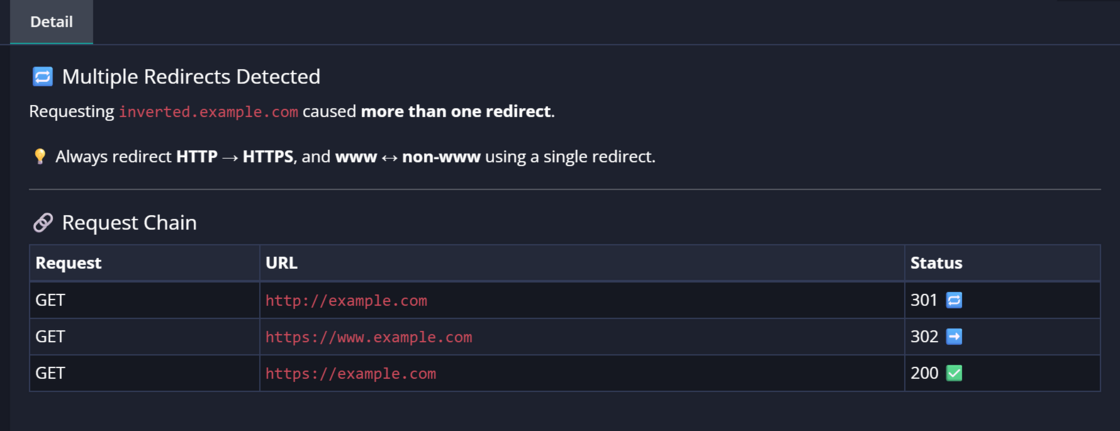
Existing features like the Canonical checker, SSL Scoring, and the Security checker have been updated to use markdown in the logged messages:

Markdown support in log message details

September newsletter

We published a new issue of the elmah.io Newsletter: https://mailchi.mp/elmah/understanding-graphql-in-net-when-and-why-to-use-it-and-more-elmah-io-news-16558623

Newsletter

If you want to receive an email every 2-3 months with all of the recent goodies on elmah.io, make sure to subscribe here: http://eepurl.com/dE1hCn

Blogged: Visualizing LINQ Queries with LINQPad: Boost Your EF Core Debugging

https://blog.elmah.io/visualizing-linq-queries-with-linqpad-boost-your-ef-core-debugging/

Visualizing LINQ Queries with LINQPad: Boost Your EF Core Debugging

Debug EF Core queries with ease using LINQPad. Visualize LINQ, explore data, and see generated SQL instantly for faster troubleshooting.

New

Elmah.Io.Cli 5.2.92 with improvements to the tail command

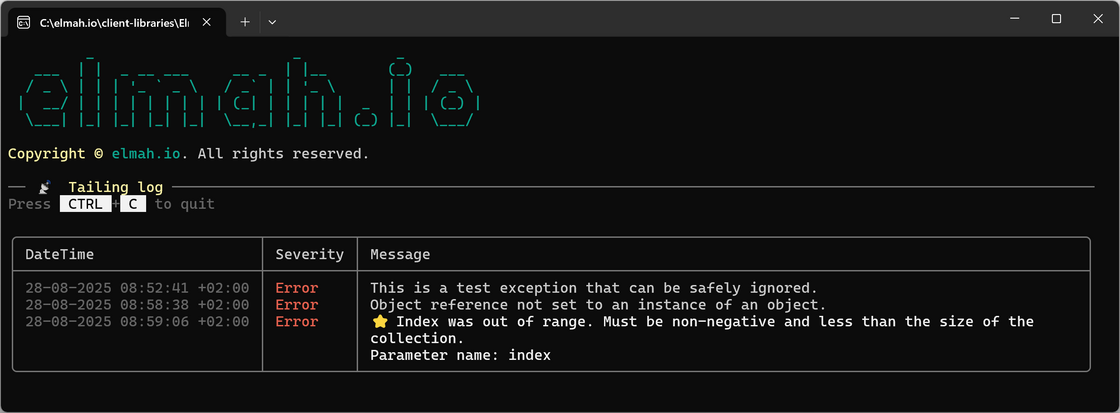
We released a new version of the elmah.io CLI. This version improves the tail command in several ways. tail can be used to inspect changes to a log and is great for both monitoring and validating that an elmah.io in a project works as expected.

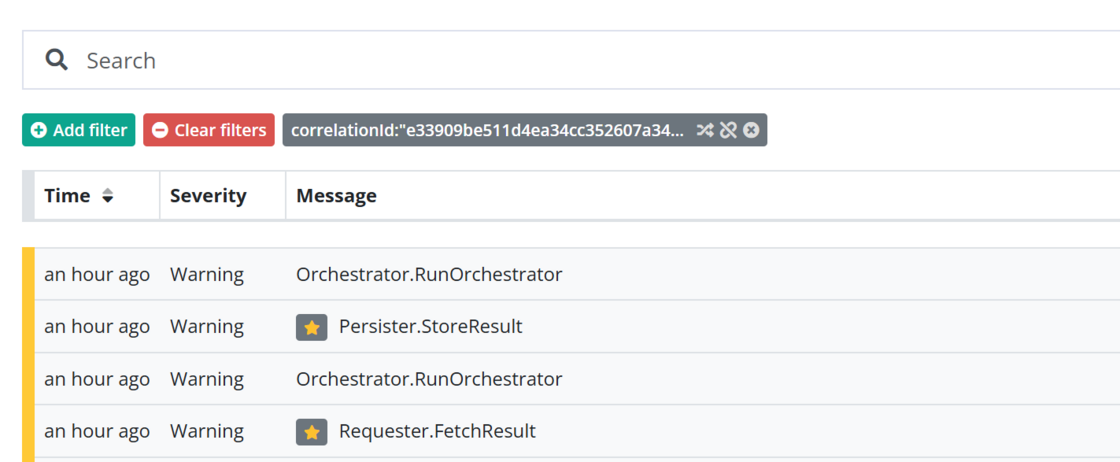
Besides a new information header and instructions for how to exit the program, the tail command now makes live updates to a table instead of writing a new table for every log message. The date format has been improved, and new log messages are now marked with a yellow star ⭐ indicating recently added log messages:

Elmah.Io.Cli 5.2.92 with improvements to the tail command

Blogged: Mastering Incremental Source Generators in C#: A Complete Guide with Example

https://blog.elmah.io/mastering-incremental-source-generators-in-csharp-a-complete-guide-with-example/

Mastering Incremental Source Generators in C#: A Complete Guide with Example

Master Incremental Source Generators in C#. Learn setup, examples, benchmarks, and best practices for faster, cache-friendly code gen in .NET.

New

Logging a warning when SSL score decreased

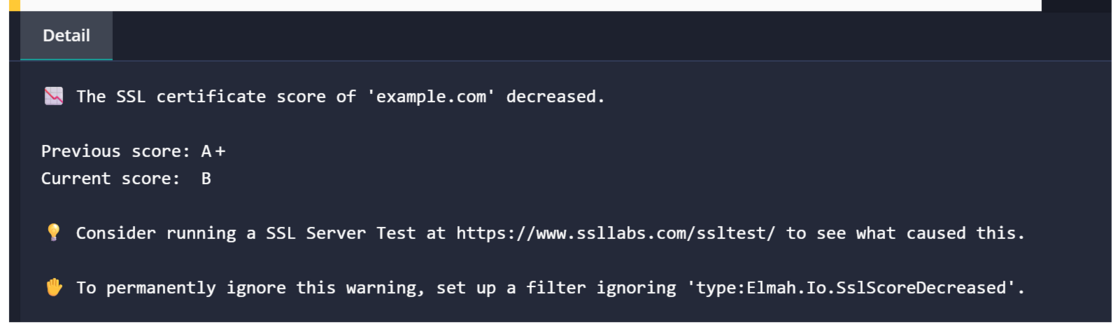
As part of the SSL Certificate Expiration check, we also collect the SSL score available from SSL Labs (available for Enterprise users only). Previously, this was only used to show the current score on the uptime check, but we have extended this to now log a warning if a decrease in the score is identified:

image.png

New

Documentation for correlating messages in Durable Azure Functions

For everyone using Durable Azure Functions, there’s a new section in the documentation showing how to correlate messages using Distributed Tracing: https://docs.elmah.io/how-to-correlate-messages-across-services/#durable-azure-functions.

Documentation for correlating messages in Durable Azure Functions

New

Send email verification from organization settings

Organization admins can now send verification emails from Organization Settings, making it easy to get existing users to verify their email address. We don’t require verified emails for users created before adding this feature, but you can use it if you want to verify emails for all users in your existing organization.

Send email verification from organization settings

For more information, check out the updated documentation.

Blogged: How I Reduced API Response Time by 70% in a Large .NET Project

https://blog.elmah.io/penhow-i-reduced-api-response-time-by-70-in-a-large-net-project/

How I Reduced API Response Time by 70% in a Large .NET Project

Boost your .NET API performance! Learn 16 proven techniques I used to reduce response times by 70% with EF Core, caching, and smart queries.

New

Email verification required

We have tightened security on elmah.io by now requiring email verification when signing up new users. This applies to both users signing up with a username/password and through a social provider. The change doesn’t require any immediate actions from existing users. New users will need to verify the email address used when signing up through the normal flow or an invite.

We are working on extending user administration with an overview of verified and non-verified users to help organization administrators get all email addresses in the organization verified, if this is desired.

Blogged: Implementing Audit Logs in EF Core Without Polluting Your Entities

https://blog.elmah.io/implementing-audit-logs-in-ef-core-without-polluting-your-entities/

Implementing Audit Logs in EF Core Without Polluting Your Entities

Learn how to implement audit logging in EF Core with PostgreSQL, tracking entity changes, timestamps, and users for compliance and security.

Blogged: How to integration test exception handlers in ASP.NET Core

https://blog.elmah.io/how-to-integration-test-exception-handlers-in-asp-net-core/

How to integration test exception handlers in ASP.NET Core

Learn how to integration test custom exception handlers in ASP.NET Core using NUnit and WebApplicationFactory to ensure error handling works.

New

Bugster configuration moved to organization settings

As announced as part of the changelog Unification of Bugster and the AI tab, Bugster configuration has now been moved from the ChatGPT app on each log to the organization settings page. Bugster is available for asking general questions about elmah.io, allowing everyone in the organization to use it without further configuration.

If you want Bugster to help analyze why an error is occurring (by clicking the Analyze with Bugster button on error details), you will need to reconfigure the settings previously in the ChatGPT app. We have decided not to automatically move the existing configuration, since that could potentially introduce AI on logs where it was not previously installed.

To configure Bugster, make sure that you are an organization admin, then go to the Organization Settings page and select the Bugster tab. Here you can enable extended access to your log data and decide which details besides the error details you want to share with Bugster:
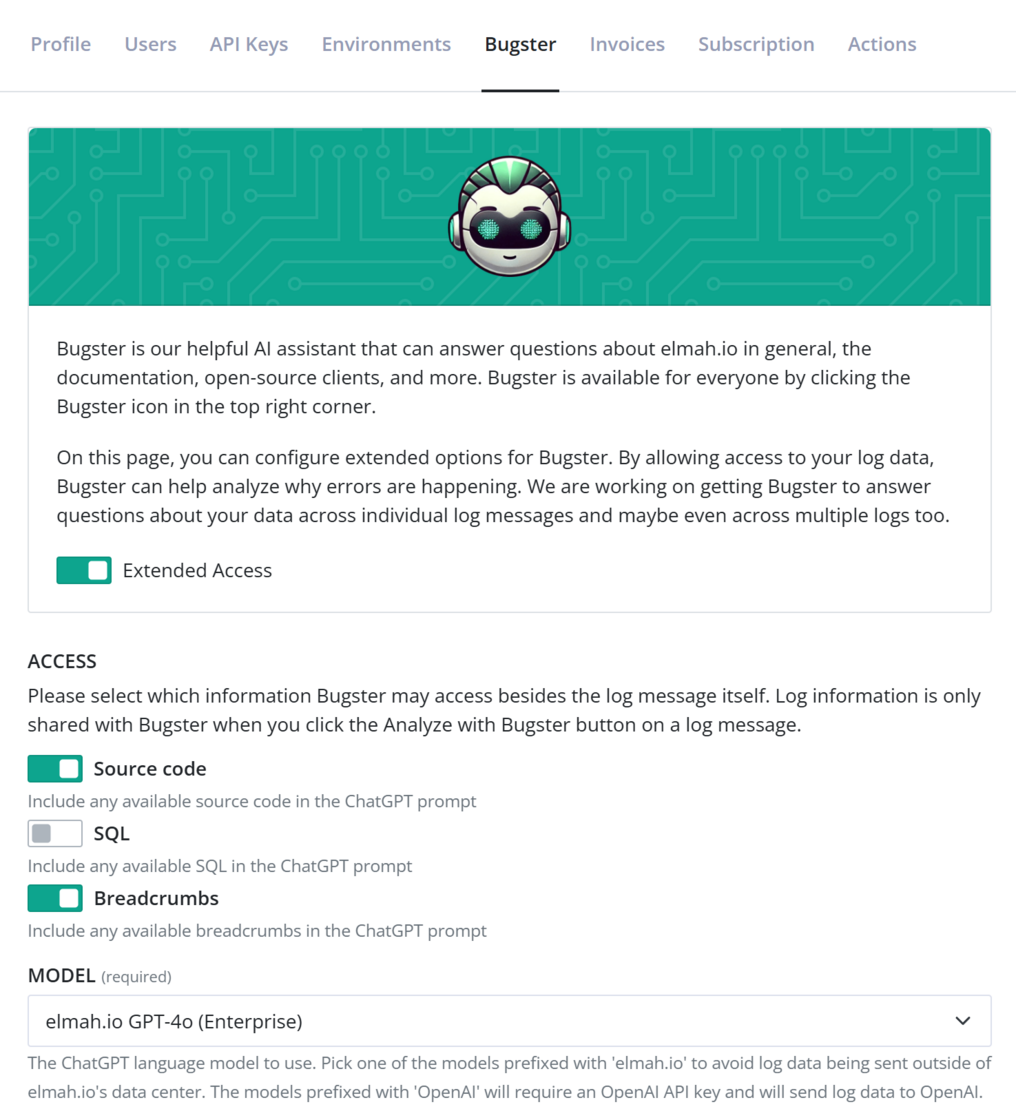
Bugster configuration

Please note that enabling access will still only send information to Bugster when you click the Analyze with Bugster button. We do not use your log data to train Bugster.

Users on the Enterprise plan can select one of the models hosted by us. Business and Business+ users need to provide their own OpenAI API key.
Blogged: Exploring Source Generators in C#: Real-World Examples

https://blog.elmah.io/exploring-source-generators-in-c-real-world-examples/

Exploring Source Generators in C#: Real-World Examples

Learn how C# source generators automate boilerplate code at compile time. Explore real-world examples and boost your development productivity.

New

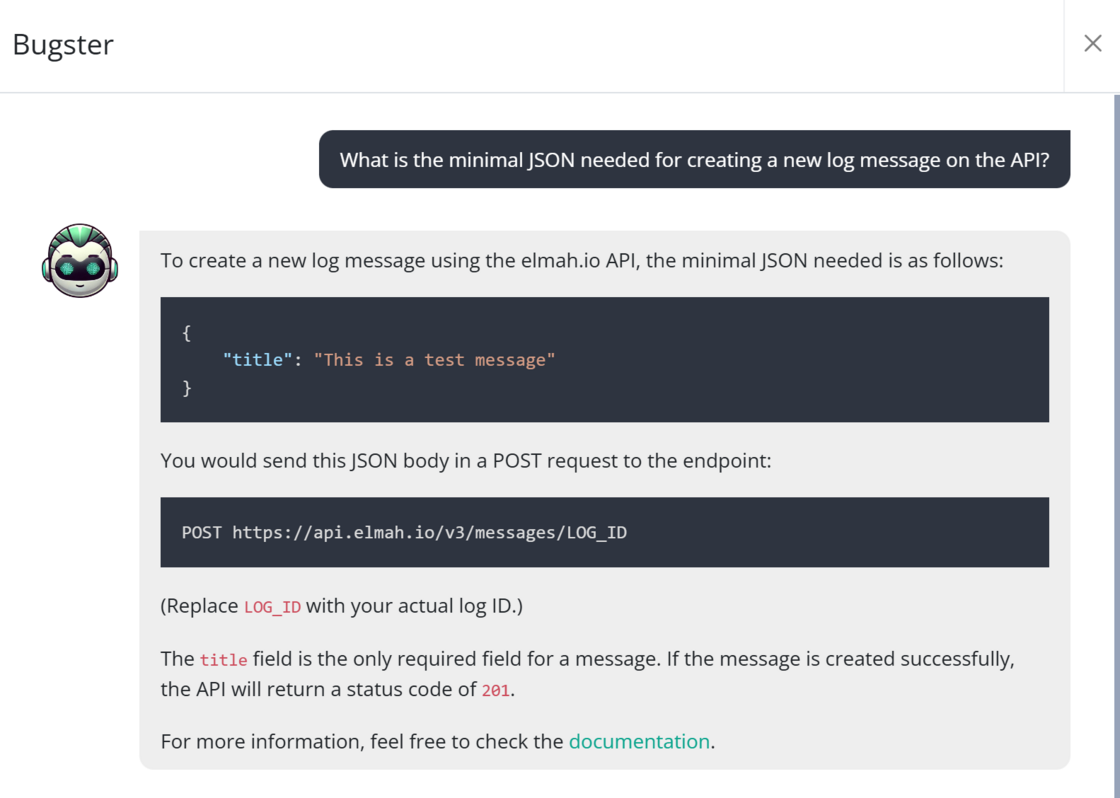
Bugster now supports questions about the elmah.io API

Bugster, our AI-powered chatbot, now supports questions about the elmah.io API. You can ask about the various endpoints, which input parameters to use, response status codes, and more. Since Bugster has access to both the API and the client integrations, you can ask it to combine the two by asking for something like client code in both PowerShell, using the API directly, and C#, using the Elmah.Io.Client package.

Bugster now supports questions about the elmah.io API

New

elmah.io for Visual Studio 2022 version 3.4.30

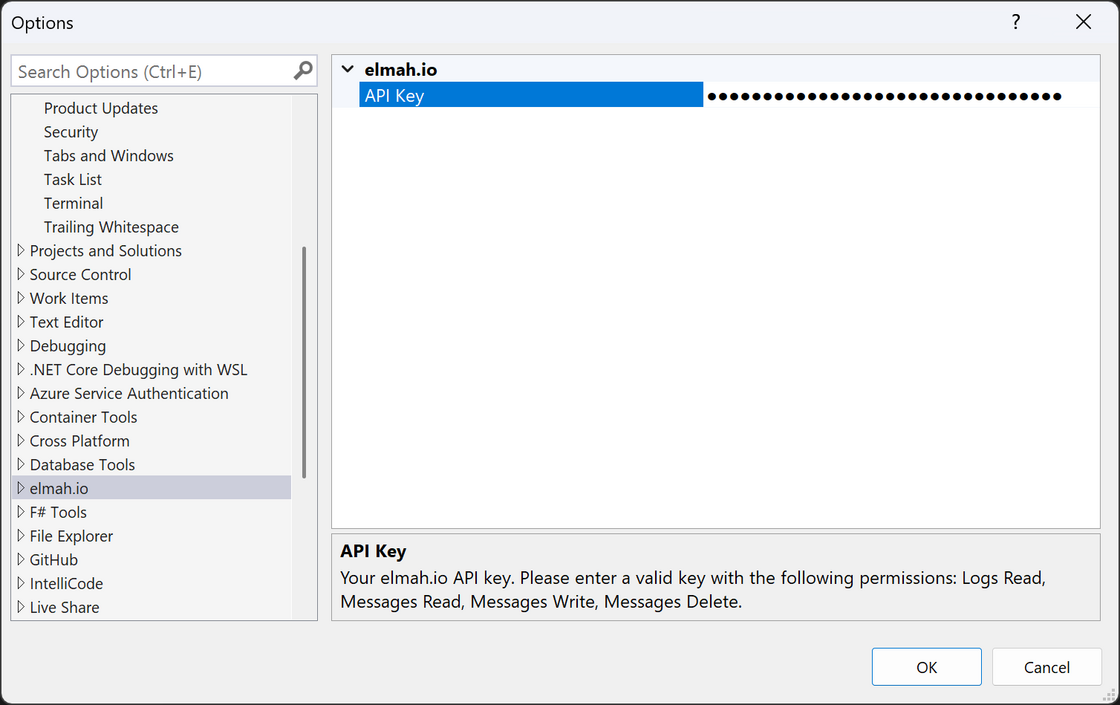
There’s a new version of the elmah.io extension for Visual Studio 2022 (3.4.30). The version includes a new options page where you can manually add and remove an elmah.io API key to avoid going through the login flow.

Visual Studio options

Blogged: Using Result or OneOf for Better Error Handling in .NET

https://blog.elmah.io/using-result-t-or-oneof-t-for-better-error-handling-in-net/

Using Result<T> or OneOf<T> for Better Error Handling in .NET

Improve error handling in .NET APIs using Result<T> and OneOf<T>. Return clear, structured success or failure outcomes with better control.