elmah.io changelog

Cloudflare added to sub-processors

Cloudflare has been added to the list of sub-processors. We use Cloudflare as a web application firewall and content delivery network in front of our websites. That means Cloudflare processes the IP address and request details of visitors in order to filter malicious traffic and deliver pages.

Let us know if you have any questions.

Blogged: Designing APIs for AI agents: your API has a new user

https://blog.elmah.io/designing-apis-for-ai-agents-your-api-has-a-new-user/

Designing APIs for AI agents: your API has a new user

ASP.NET Core patterns for designing AI-agent-ready APIs: DTOs, idempotency keys, pagination, machine-readable errors, and fine-grained auth.

Improvement

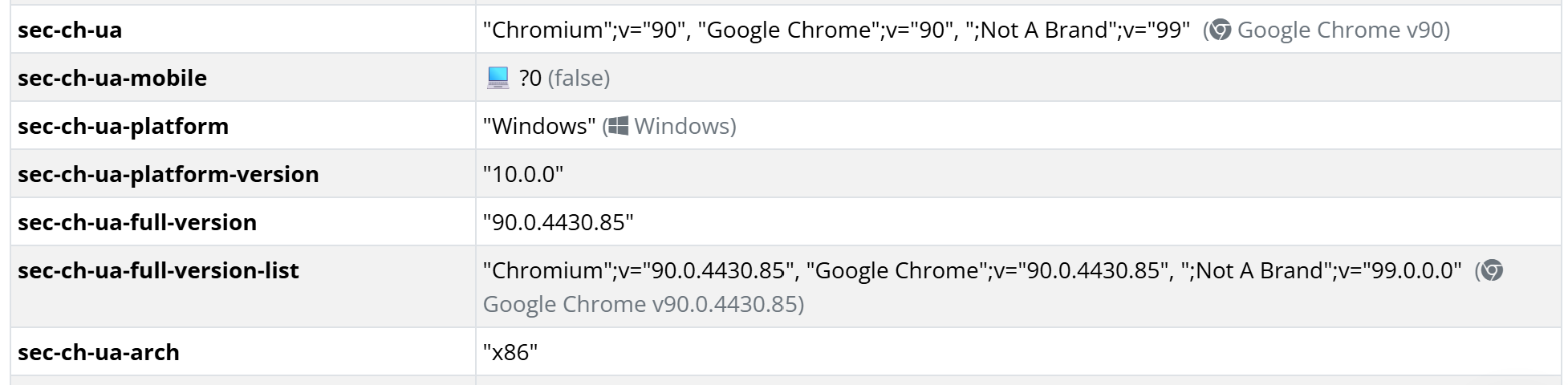
More visualizations on the Server Variables tab

We’ve added visualizers for a few more values on the Server Variables tab:

More visualizations on the Server Variables tab

New

New documentation: Add MCP Server to Antigravity

There’s a new page on the documentation site explaining how to Add the elmah.io MCP Server to Antigravity.

New

Blazor Web App sample and documentation

We added a sample showing how to log from a Blazor Web App to the Elmah.Io.Blazor.Wasm repository. It combines Elmah.Io.Extensions.Logging (plus Elmah.Io.AspNetCore.ExtensionsLogging) in the Server project with Elmah.Io.Blazor.Wasm in the Client project, covering all four Blazor render modes: Static Server, Interactive Server, Interactive WebAssembly, and Interactive Auto. Blazor Web App is now the first section on the Blazor docs page: https://docs.elmah.io/logging-to-elmah-io-from-blazor/

Blogged: Swagger vs. Scalar: A comprehensive comparison for ASP.NET Core developers

https://blog.elmah.io/swagger-vs-scalar-a-comprehensive-comparison-for-asp-net-core-developers/

Swagger vs. Scalar: A comprehensive comparison for ASP.NET Core developers

ASP.NET Core 10 dropped Swagger UI from its default project template. See how Swagger stacks up against Scalar for API docs, and set up each one.

September newsletter

We published a new issue of the elmah.io Newsletter: https://mailchi.mp/elmah/simplifying-file-logging-in-asp-net-core-with-serilog-16566329

Newsletter

If you want to receive an email every 2-3 months with all of the recent goodies on elmah.io, make sure to subscribe here: http://eepurl.com/dE1hCn

Blogged: Using C# 14 to build "Smart records" for config & settings models

https://blog.elmah.io/using-c-14-to-build-smart-records-for-config-settings-models/

Using C# 14 to build "Smart records" for config & settings models

Discover how C# 14 extension members turn plain records into self-validating, immutable configuration models for cleaner ASP.NET Core apps today.

New MCP server tools to hide, fix, and mark messages as bot

The MCP server now exposes six new tools for managing log messages: messages_hide, messages_unhide, messages_fix, messages_open, messages_bot, and messages_unbot. These let an AI client hide noisy messages, mark errors as fixed (or reopen them), and flag messages as bot traffic (or undo that), directly from a conversation with Claude, Codex, or another MCP client.

messages_hide, messages_fix, and messages_open accept an optional flag to apply the change to every other message sharing the same grouping hash, while messages_bot and messages_unbot take a list of up to 500 message IDs per call. All six tools only act when a user has explicitly asked for that specific change, never speculatively while an AI is just investigating errors.

The documentation has been updated to include the new tools.

Blogged: Getting started with RAG in ASP.NET Core

https://blog.elmah.io/getting-started-with-rag-in-asp-net-core/

Getting started with RAG in ASP.NET Core

A beginner’s guide to RAG: build a simple keyword-matching retrieval pipeline in an ASP.NET Core Web API, step by step, no embeddings needed.

New

Elmah.Io.Cli 5.4.104 with API key as environment variable

We released a new version of the elmah.io CLI. The new version contains the following changes:

The documentation has been updated to show the use of the new environment variable.

New

New documentation: Add MCP Server to Codex

There’s a new page on the documentation site explaining how to Add the elmah.io MCP Server to Codex.

New

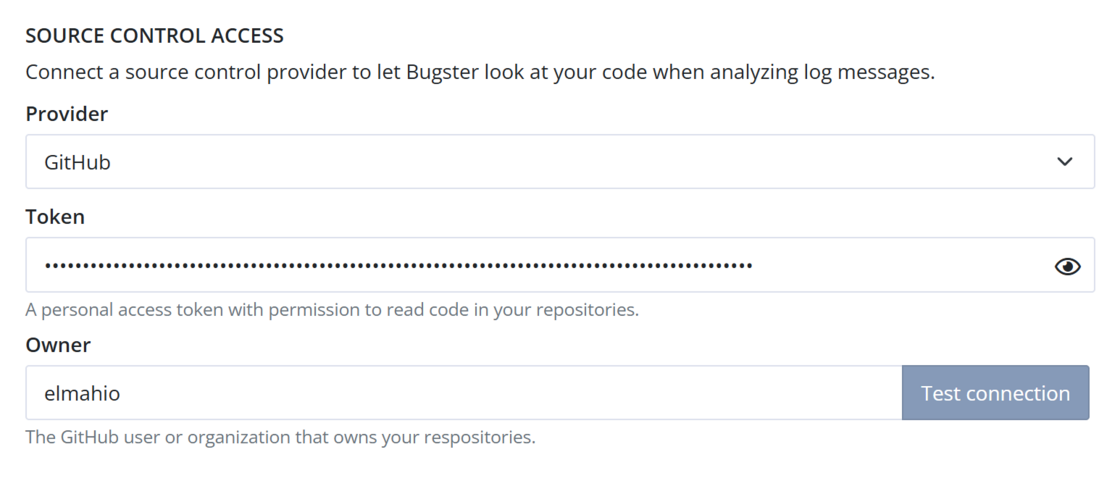
Allow Bugster access to source control

Bugster, the helpful AI agent on elmah.io, just received an improvement that can significantly improve the answers to your questions about your logs: source control access. In the Bugster configuration, you can pick either GitHub or Azure DevOps to allow Bugster to look up source files in your repositories. The connection is configured on the Organization Settings page, while picking a repository is available on the Log Settings page. This allows for configuring the connection once and then picking individual (or the same) code repositories per log.

Check out the updated documentation to learn how to set it up: Give Bugster access to your source code.

Allow Bugster access to source control

Blogged: Building your first MCP server in ASP.NET Core

https://blog.elmah.io/building-your-first-mcp-server-in-asp-net-core/

Building your first MCP server in ASP.NET Core

Learn how to build an MCP server in ASP.NET Core using ModelContextProtocol.AspNetCore to expose AI-callable tools to Claude and ChatGPT.

New

New description field on rules

There’s a new description field when creating/editing rules. You can use this field to document why a rule is created and what it does. To inspect the description, either edit the rule or click the information icon on each rule on the Rules page.

New description field on rules

Blogged: What happens when you call await? A step-by-step runtime breakdown

https://blog.elmah.io/what-happens-when-you-call-await-a-step-by-step-runtime-breakdown/

What happens when you call await? A step-by-step runtime breakdown

Demystify C# async/await. Explore state machines, thread management, and how the .NET runtime handles non-blocking I/O under the hood.

Blogged: Solving bugs with elmah.io and Claude Code - a real-life example

https://blog.elmah.io/solving-bugs-with-elmah-io-and-claude-code-a-real-life-example/

Solving bugs with elmah.io and Claude Code - a real-life example

Learn how to use elmah.io and Claude Code with MCP to automatically fetch, debug, fix, and verify production errors right from your terminal.

New

Claude Sonnet 5 and Gemini 3 Flash now available for Bugster

Bugster now supports Claude Sonnet 5, and we have replaced Gemini 3 Flash Preview with Gemini 3 Flash. You will find the configuration for Bugster on the Organization Settings page.

The list is getting quite long again. If you are using a deprecated model, please upgrade, as Bugster won’t be able to answer questions once we remove those models.

Claude Sonnet 5 and Gemini 3 Flash now available for Bugster

New

New hidden filter on message tools on MCP server

The messages_list_recent, messages_list_frequent, and messages_count tools on the MCP server have been extended to include a new hidden filter. This will make it possible for the AI client to filter log messages based on whether they are hidden or not. Previously, all log messages were returned, no matter if they were marked as hidden or not. Having a default value of false, this means that the behavior now changes to filter out hidden messages by default.

New

Correlating messages from Durable Functions in isolated model

We’ve added a new section to the correlation docs covering Durable Functions running in the isolated worker model (dotnet-isolated), where linking log messages across the starter, orchestrator, and activity functions needs a bit more setup than other trigger types. Check out the Durable Azure Functions guide for more details.