elmah.io changelog

Improvement

Changed and re-ordered icons

We usually don’t publish minor changes on this changelog, but I want to put a few words on a recent improvement to avoid any confusion. We’ve changed the icon for the organization overview from the eye to a chart to better illustrate what feature will trigger when clicking the icon. While doing so, we also switched the two icons around in the menu and on the dashboard to match what is there for log settings and search. So, in the future, when you need to access organization settings, click the first icon (gears). And when you need to access the organization overview, click the second icon (chart).
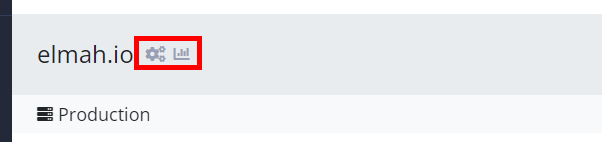
Changed and re-ordered icons

Blogged: Deploy Access Restricted Azure website from DevOps Pipelines

https://blog.elmah.io/deploy-access-restricted-azure-website-from-devops-pipelines/

Deploy Access Restricted Azure website from DevOps Pipelines

New

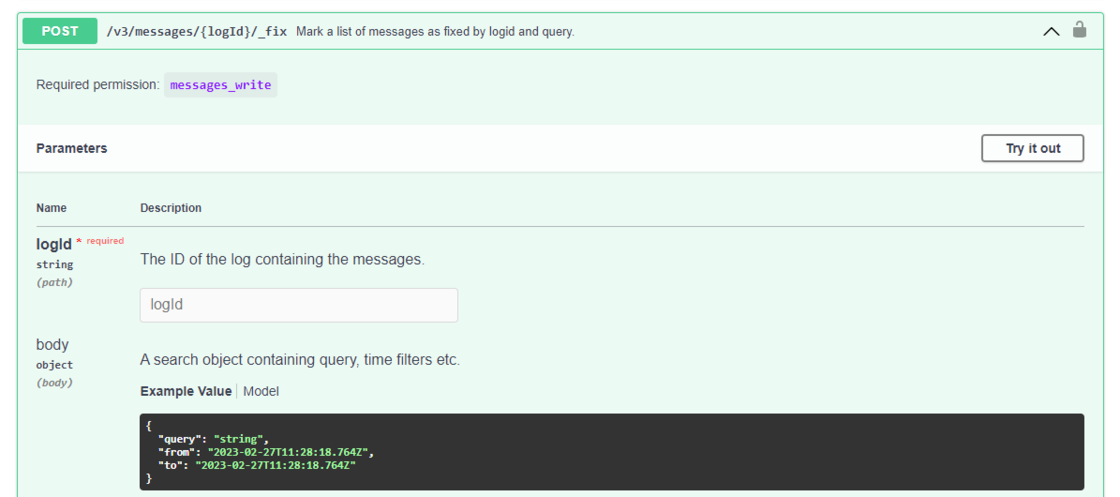
New endpoint to batch mark messages as fixed

There’s a new endpoint on the API that can be used to mark multiple log messages as fixed:

New endpoint to batch mark messages as fixed

The new endpoint is available in the latest prerelease of the Elmah.Io.Client NuGet package, from an HTTP client, or manually from Swagger UI.

New

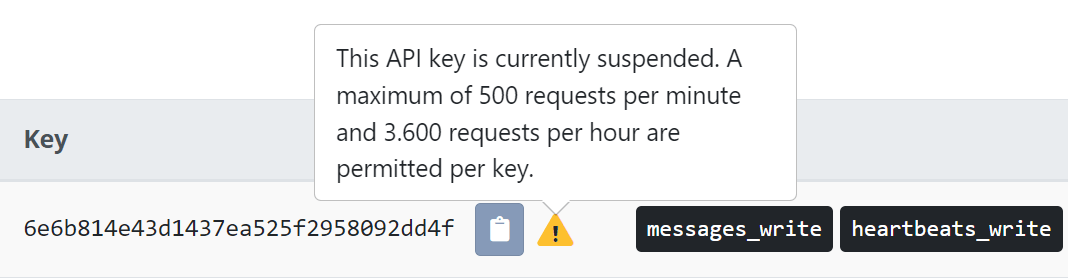
Warning on suspended API keys

To help you detect when an API key is being suspended by the API request limit, we have added a warning directly to the list of API keys. The warning will show as a small icon next to the key on suspended keys:

Warning on suspended API keys

As shown in the screenshot, all API keys can make 500 requests per minute and 3.600 requests per hour.

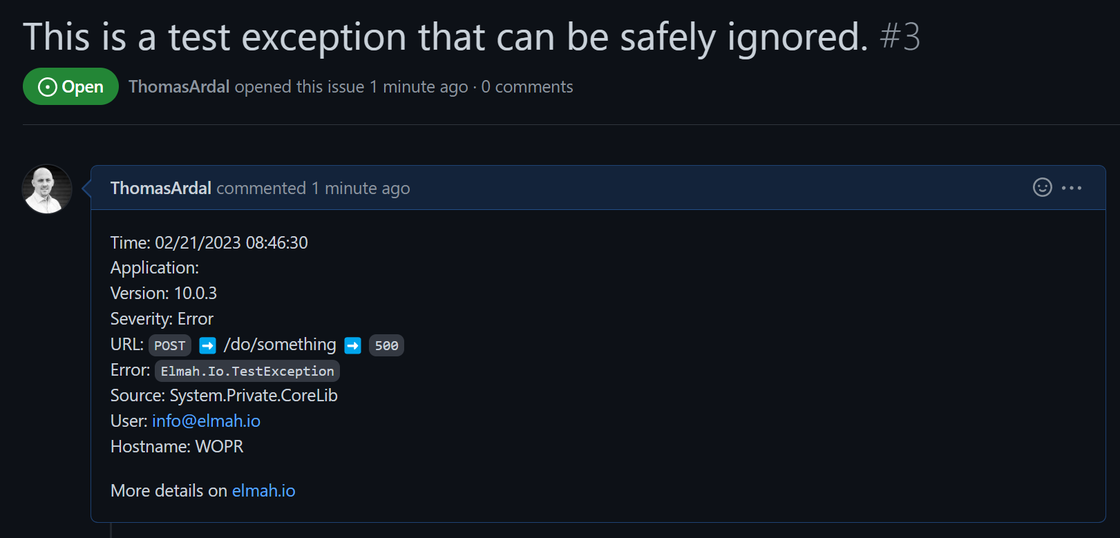
Improved GitHub integration

The GitHub integration has been extended to include more fields as well as a link back to the full error details on elmah.io. To get the new integration, edit and save any existing GitHub apps or set it up using a personal access token or a fine-grained token as explained in the documentation.

Improved GitHub integration

Blogged: Creating Visual Studio extensions using Roslyn analyzers

https://blog.elmah.io/creating-visual-studio-extensions-using-roslyn-analyzers/

Creating Visual Studio extensions using Roslyn analyzers

Blogged: Creating and downloading zip files with ASP.NET Core

https://blog.elmah.io/creating-and-downloading-zip-files-with-asp-net-core/

Creating and downloading zip files with ASP.NET Core

New

Category field on log messages

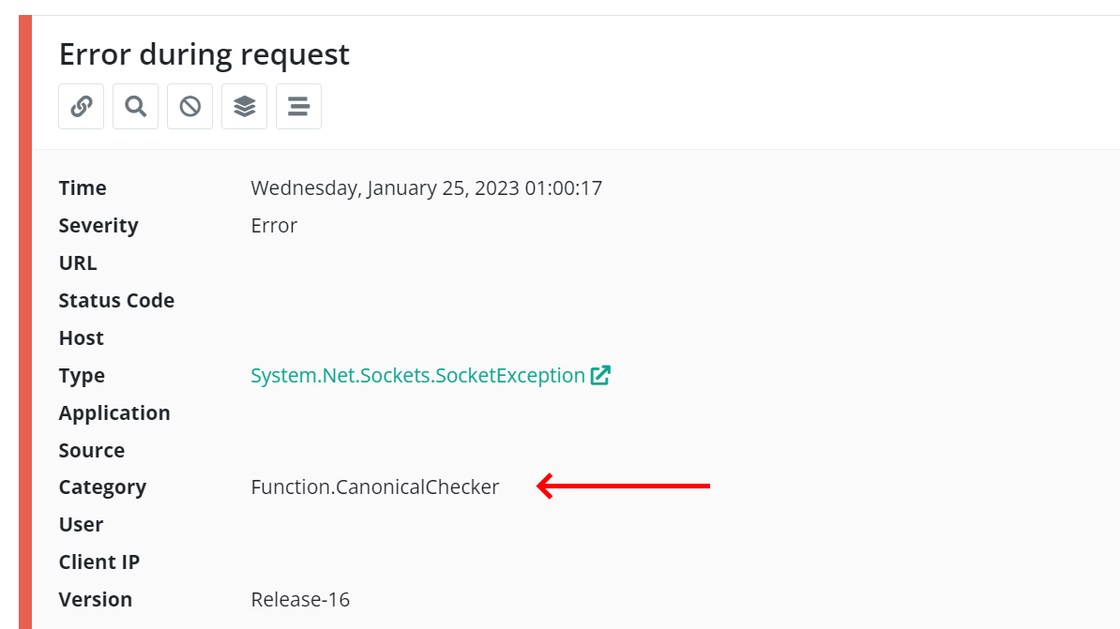
There’s a new field on all log messages named Category. This may sound like a minor addition but it’s actually something that is available throughout a larger part of elmah.io. The category field can be set on all log messages stored through the API. The field and value show up inside the elmah.io UI on the details:

Category

Unless you are logging messages manually through the API or the Elmah.Io.Client package, you typically don’t need to set the field. New prereleases have been published of the Elmah.Io.Extensions.Logging, Elmah.Io.NLog, Elmah.Io.Log4Net, and Serilog.Sinks.ElmahIo NuGet packages. These integrations automatically pick up the category from the logging framework and set the new field. Having a category or logger name is something common for all logging frameworks. We have adopted the name from Microsoft.Extensions.Logging which calls it Category, NLog and log4net call it LoggerName, and Serilog calls it SourceContext.

Besides being available as a field on the log message details, Category can be used from the search field, search filters, the group by dropdown, as a column on the search result, and as part of rules.

New

Integration with PagerDuty

There’s a new integration in the elmah.io App Store: PagerDuty. PagerDuty is an incident platform supporting various integrations and notification methods like phone calls, SMS/text messages, and emails. With a few mouse clicks, setting up advanced notification rules for your team is easier than ever.

Check out the PagerDuty documentation for details on how to set it up.

New

Elmah.Io.Umbraco 4.2.21 with new Elmah.Io NuGet packages

We released a new version (4.2.21) of the Elmah.Io.UmbracoNuGet package. Unless serious security issues are found, new features will be added to the v5 package only (supporting Umbraco 10 and newer). The new version includes the following changes:

New

Elmah.Io 4.3.40 with build script modernization and newest Elmah.Io.Client

We released a new version (4.3.40) of the Elmah.Io, Elmah.Io.Mvc, Elmah.Io.WebApi, and Elmah.Io.AspNet NuGet packages. The new version includes the following changes:

New

Canonical Check out of beta

The Canonical Check feature is now out of beta. When enabling canonical checks on an endpoint, the following checks are automatically run daily:

Canonical checks are available for all Enterprise customers.

New

Elmah.Io.Log4Net 4.2.22 with .NET 7 sample

We released a new version (4.2.22) of the Elmah.Io.Log4Net NuGet package. The new version includes the following changes:

New

Serilog.Sinks.ElmahIo 4.2.25 with .NET 7 sample

We released a new version (4.2.25) of the Serilog.Sinks.ElmahIo NuGet package. The new version includes the following changes:

New

Elmah.Io.Extensions.Logging 4.2.36 with synchronous logging

We released a new version (4.2.36) of the Elmah.Io.Extensions.Logging NuGet package. The new version includes the following changes:

New

Elmah.Io.AspNetCore 4.3.38 with .NET 7 sample

We released a new version (4.3.38) of the Elmah.Io.AspNetCore NuGet package. The new version includes the following changes:

New

Integration with PoShLog (PowerShell)

There’s a new integration with PoShLog. For those of you who may not know PoShLog, it’s a PowerShell logging module built on top of Serilog. The elmah.io sink for PoShLog brings easy logging to elmah.io from PowerShell using code like this:

Import-Module PoShLog
Import-Module PoShLog.Sinks.ElmahIo

New-Logger |
    Add-SinkElmahIo -ApiKey 'API_KEY' -LogId 'LOG_ID' |
    Start-Logger

Write-ErrorLog 'Say My Name'

The integration is available in the PowerShell Gallery and documented on Logging to elmah.io from PowerShell.

December newsletter

We published a new issue of the elmah.io Newsletter: https://mailchi.mp/elmah/best-chrome-extensions-for-web-developers-and-more-elmah-io-news

Newsletter

If you want to receive an email every 2-3 months with all of the recent goodies on elmah.io, make sure to subscribe here: http://eepurl.com/dE1hCn

Blogged: Logging and global error handling in .NET 7 WPF applications

https://blog.elmah.io/logging-and-global-error-handling-in-net-7-wpf-applications/

Logging and global error handling in .NET 7 WPF applications

New

Integration with WPF in prerelease

You asked for it. We deliver 😊 There’s a new prerelease of support for Windows Presentation Foundation (WPF). The integration is implemented in the Elmah.Io.Wpf NuGet package. When installed, simply call the Init method to have uncaught exceptions logged in elmah.io:

ElmahIoWpf.Init(new ElmahIoWpfOptions
{
    ApiKey = "API_KEY",
    LogId = new Guid("LOG_ID")
});

The package already has some nice features like maintaining breadcrumbs, storing WPF properties, and more. To learn more, visit the updated documentation and check out the samples for both .NET Framework and .NET 6.