<?xml version="1.0" encoding="utf-8"?><feed xmlns="http://www.w3.org/2005/Atom" ><generator uri="https://jekyllrb.com/" version="3.10.0">Jekyll</generator><link href="https://changelog.elmah.io/feed.xml" rel="self" type="application/atom+xml" /><link href="https://changelog.elmah.io/" rel="alternate" type="text/html" /><updated>2026-10-06T10:45:51+00:00</updated><id>https://changelog.elmah.io/feed.xml</id><title type="html">elmah.io changelog</title><subtitle>New features, fixes, and improvements to elmah.io - AI-powered error logging and uptime monitoring for .NET.</subtitle><entry><title type="html">Cloudflare added to sub-processors</title><link href="https://changelog.elmah.io/cloudflare-added-to-sub-processors/" rel="alternate" type="text/html" title="Cloudflare added to sub-processors" /><published>2026-10-06T09:30:00+00:00</published><updated>2026-10-06T09:30:00+00:00</updated><id>https://changelog.elmah.io/cloudflare-added-to-sub-processors</id><content type="html" xml:base="https://changelog.elmah.io/cloudflare-added-to-sub-processors/"><![CDATA[<p>Cloudflare has been added to the <a href="https://elmah.io/legal/sub-processors/">list of sub-processors</a>. We use Cloudflare as a web application firewall and content delivery network in front of our websites. That means Cloudflare processes the IP address and request details of visitors in order to filter malicious traffic and deliver pages.</p>

<p>Let us know if you have any questions.</p>]]></content><author><name></name></author><summary type="html"><![CDATA[Cloudflare has been added to the list of sub-processors. We use Cloudflare as a web application firewall and content delivery network in front of our websites. That means Cloudflare processes the IP address and request details of visitors in order to filter malicious traffic and deliver pages.]]></summary></entry><entry><title type="html">Blogged: Designing APIs for AI agents: your API has a new user</title><link href="https://changelog.elmah.io/blogged-designing-apis-for-ai-agents-your-api-has-a-new-user/" rel="alternate" type="text/html" title="Blogged: Designing APIs for AI agents: your API has a new user" /><published>2026-10-06T05:15:00+00:00</published><updated>2026-10-06T05:15:00+00:00</updated><id>https://changelog.elmah.io/blogged-designing-apis-for-ai-agents-your-api-has-a-new-user</id><content type="html" xml:base="https://changelog.elmah.io/blogged-designing-apis-for-ai-agents-your-api-has-a-new-user/"><![CDATA[<p><a href="https://blog.elmah.io/designing-apis-for-ai-agents-your-api-has-a-new-user/">https://blog.elmah.io/designing-apis-for-ai-agents-your-api-has-a-new-user/</a></p>

<p><a href="https://blog.elmah.io/designing-apis-for-ai-agents-your-api-has-a-new-user/"><img src="/images/designing-apis-for-ai-agents-your-api-has-a-new-user/feature.png" alt="Designing APIs for AI agents: your API has a new user" /></a></p>

<p>ASP.NET Core patterns for designing AI-agent-ready APIs: DTOs, idempotency keys, pagination, machine-readable errors, and fine-grained auth.</p>]]></content><author><name></name></author><summary type="html"><![CDATA[https://blog.elmah.io/designing-apis-for-ai-agents-your-api-has-a-new-user/]]></summary></entry><entry><title type="html">More visualizations on the Server Variables tab</title><link href="https://changelog.elmah.io/more-visualizations-on-the-server-variables-tab/" rel="alternate" type="text/html" title="More visualizations on the Server Variables tab" /><published>2026-10-01T07:00:00+00:00</published><updated>2026-10-01T07:00:00+00:00</updated><id>https://changelog.elmah.io/more-visualizations-on-the-server-variables-tab</id><content type="html" xml:base="https://changelog.elmah.io/more-visualizations-on-the-server-variables-tab/"><![CDATA[<p>We’ve added visualizers for a few more values on the <em>Server Variables</em> tab:</p>

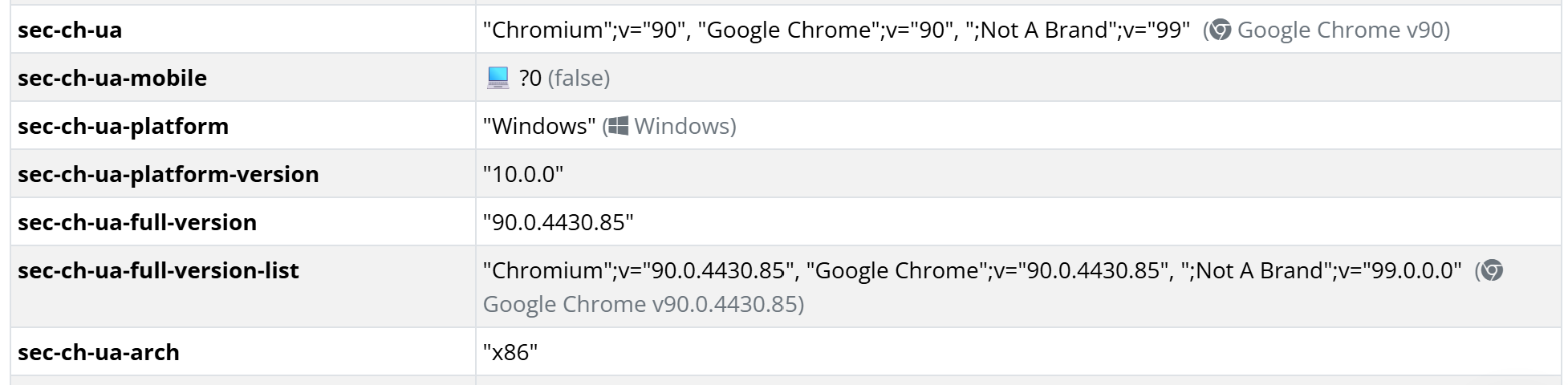
<ul>
  <li><code class="language-plaintext highlighter-rouge">Accept-Language</code> shows a flag and the language name next to each entry, like <code class="language-plaintext highlighter-rouge">en-US,en;q=0.9</code>.</li>
  <li><code class="language-plaintext highlighter-rouge">sec-ch-ua</code> and <code class="language-plaintext highlighter-rouge">sec-ch-ua-full-version-list</code> show the browser name and version with a browser icon.</li>
  <li><code class="language-plaintext highlighter-rouge">sec-ch-ua-platform</code> shows an icon for the operating system, like Windows.</li>
  <li><code class="language-plaintext highlighter-rouge">sec-ch-ua-mobile</code> shows a device icon and whether the value means true or false.</li>
</ul>

<p><img src="/images/more-visualizations-on-the-server-variables-tab/server-variables-visualizations.png" alt="More visualizations on the Server Variables tab" /></p>]]></content><author><name></name></author><category term="Improvement" /><summary type="html"><![CDATA[We’ve added visualizers for a few more values on the Server Variables tab:]]></summary></entry><entry><title type="html">New documentation: Add MCP Server to Antigravity</title><link href="https://changelog.elmah.io/new-documentation-add-mcp-server-to-antigravity/" rel="alternate" type="text/html" title="New documentation: Add MCP Server to Antigravity" /><published>2026-09-24T13:19:57+00:00</published><updated>2026-09-24T13:19:57+00:00</updated><id>https://changelog.elmah.io/new-documentation-add-mcp-server-to-antigravity</id><content type="html" xml:base="https://changelog.elmah.io/new-documentation-add-mcp-server-to-antigravity/"><![CDATA[<p>There’s a new page on the documentation site explaining how to <a href="https://docs.elmah.io/add-mcp-server-to-antigravity/">Add the elmah.io MCP Server to Antigravity</a>.</p>]]></content><author><name></name></author><category term="New" /><summary type="html"><![CDATA[There’s a new page on the documentation site explaining how to Add the elmah.io MCP Server to Antigravity.]]></summary></entry><entry><title type="html">Blazor Web App sample and documentation</title><link href="https://changelog.elmah.io/blazor-web-app-sample-and-documentation/" rel="alternate" type="text/html" title="Blazor Web App sample and documentation" /><published>2026-09-22T09:36:53+00:00</published><updated>2026-09-22T09:36:53+00:00</updated><id>https://changelog.elmah.io/blazor-web-app-sample-and-documentation</id><content type="html" xml:base="https://changelog.elmah.io/blazor-web-app-sample-and-documentation/"><![CDATA[<p>We added a sample showing how to log from a Blazor Web App to the <code class="language-plaintext highlighter-rouge">Elmah.Io.Blazor.Wasm</code> repository. It combines <code class="language-plaintext highlighter-rouge">Elmah.Io.Extensions.Logging</code> (plus <code class="language-plaintext highlighter-rouge">Elmah.Io.AspNetCore.ExtensionsLogging</code>) in the Server project with <code class="language-plaintext highlighter-rouge">Elmah.Io.Blazor.Wasm</code> in the Client project, covering all four Blazor render modes: Static Server, Interactive Server, Interactive WebAssembly, and Interactive Auto. Blazor Web App is now the first section on the Blazor docs page: <a href="https://docs.elmah.io/logging-to-elmah-io-from-blazor/">https://docs.elmah.io/logging-to-elmah-io-from-blazor/</a></p>]]></content><author><name></name></author><category term="New" /><summary type="html"><![CDATA[We added a sample showing how to log from a Blazor Web App to the Elmah.Io.Blazor.Wasm repository. It combines Elmah.Io.Extensions.Logging (plus Elmah.Io.AspNetCore.ExtensionsLogging) in the Server project with Elmah.Io.Blazor.Wasm in the Client project, covering all four Blazor render modes: Static Server, Interactive Server, Interactive WebAssembly, and Interactive Auto. Blazor Web App is now the first section on the Blazor docs page: https://docs.elmah.io/logging-to-elmah-io-from-blazor/]]></summary></entry><entry><title type="html">Blogged: Swagger vs. Scalar: A comprehensive comparison for ASP.NET Core developers</title><link href="https://changelog.elmah.io/blogged-swagger-vs-scalar-a-comprehensive-comparison-for-asp-net-core-developers/" rel="alternate" type="text/html" title="Blogged: Swagger vs. Scalar: A comprehensive comparison for ASP.NET Core developers" /><published>2026-09-22T06:22:24+00:00</published><updated>2026-09-22T06:22:24+00:00</updated><id>https://changelog.elmah.io/blogged-swagger-vs-scalar-a-comprehensive-comparison-for-asp-net-core-developers</id><content type="html" xml:base="https://changelog.elmah.io/blogged-swagger-vs-scalar-a-comprehensive-comparison-for-asp-net-core-developers/"><![CDATA[<p><a href="https://blog.elmah.io/swagger-vs-scalar-a-comprehensive-comparison-for-asp-net-core-developers/">https://blog.elmah.io/swagger-vs-scalar-a-comprehensive-comparison-for-asp-net-core-developers/</a></p>
<p><a href="https://blog.elmah.io/swagger-vs-scalar-a-comprehensive-comparison-for-asp-net-core-developers/"><img src="/images/swagger-vs-scalar-a-comprehensive-comparison-for-asp-net-core-developers/feature.png" alt="Swagger vs. Scalar: A comprehensive comparison for ASP.NET Core developers" /></a></p>

<p>ASP.NET Core 10 dropped Swagger UI from its default project template. See how Swagger stacks up against Scalar for API docs, and set up each one.</p>]]></content><author><name></name></author><summary type="html"><![CDATA[https://blog.elmah.io/swagger-vs-scalar-a-comprehensive-comparison-for-asp-net-core-developers/]]></summary></entry><entry><title type="html">September newsletter</title><link href="https://changelog.elmah.io/september-newsletter-345903/" rel="alternate" type="text/html" title="September newsletter" /><published>2026-09-09T16:56:38+00:00</published><updated>2026-09-09T16:56:38+00:00</updated><id>https://changelog.elmah.io/september-newsletter-345903</id><content type="html" xml:base="https://changelog.elmah.io/september-newsletter-345903/"><![CDATA[<p>We published a new issue of the elmah.io Newsletter: <a href="https://mailchi.mp/elmah/simplifying-file-logging-in-asp-net-core-with-serilog-16566329">https://mailchi.mp/elmah/simplifying-file-logging-in-asp-net-core-with-serilog-16566329</a></p>

<p><a href="https://mailchi.mp/elmah/simplifying-file-logging-in-asp-net-core-with-serilog-16566329"><img src="/images/345903/875-33de660b4efb976961f20a1f0b80763f60365089.png" alt="Newsletter" /></a></p>

<p>If you want to receive an email every 2-3 months with all of the recent goodies on elmah.io, make sure to subscribe here: <a href="http://eepurl.com/dE1hCn">http://eepurl.com/dE1hCn</a></p>]]></content><author><name></name></author><summary type="html"><![CDATA[We published a new issue of the elmah.io Newsletter: https://mailchi.mp/elmah/simplifying-file-logging-in-asp-net-core-with-serilog-16566329]]></summary></entry><entry><title type="html">Blogged: Using C# 14 to build “Smart records” for config &amp;amp; settings models</title><link href="https://changelog.elmah.io/blogged-using-c-14-to-build-smart-records-for-config-settings-models-345714/" rel="alternate" type="text/html" title="Blogged: Using C# 14 to build “Smart records” for config &amp;amp; settings models" /><published>2026-09-08T05:46:10+00:00</published><updated>2026-09-08T05:46:10+00:00</updated><id>https://changelog.elmah.io/blogged-using-c-14-to-build-smart-records-for-config-settings-models-345714</id><content type="html" xml:base="https://changelog.elmah.io/blogged-using-c-14-to-build-smart-records-for-config-settings-models-345714/"><![CDATA[<p><a href="https://blog.elmah.io/using-c-14-to-build-smart-records-for-config-settings-models/">https://blog.elmah.io/using-c-14-to-build-smart-records-for-config-settings-models/</a></p>

<p><a href="https://blog.elmah.io/using-c-14-to-build-smart-records-for-config-settings-models/"><img src="/images/345714/805-92ae6290a761468d8ee3e74fce91e05453001db3.png" alt="Using C# 14 to build &quot;Smart records&quot; for config &amp; settings models" /></a></p>

<p>Discover how C# 14 extension members turn plain records into self-validating, immutable configuration models for cleaner ASP.NET Core apps today.</p>]]></content><author><name></name></author><summary type="html"><![CDATA[https://blog.elmah.io/using-c-14-to-build-smart-records-for-config-settings-models/]]></summary></entry><entry><title type="html">New MCP server tools to hide, fix, and mark messages as bot</title><link href="https://changelog.elmah.io/new-mcp-server-tools-to-hide-fix-and-mark-messages-as-bot-345663/" rel="alternate" type="text/html" title="New MCP server tools to hide, fix, and mark messages as bot" /><published>2026-09-07T08:42:05+00:00</published><updated>2026-09-07T08:42:05+00:00</updated><id>https://changelog.elmah.io/new-mcp-server-tools-to-hide-fix-and-mark-messages-as-bot-345663</id><content type="html" xml:base="https://changelog.elmah.io/new-mcp-server-tools-to-hide-fix-and-mark-messages-as-bot-345663/"><![CDATA[<p>The MCP server now exposes six new tools for managing log messages: <code class="language-plaintext highlighter-rouge">messages_hide</code>, <code class="language-plaintext highlighter-rouge">messages_unhide</code>, <code class="language-plaintext highlighter-rouge">messages_fix</code>, <code class="language-plaintext highlighter-rouge">messages_open</code>, <code class="language-plaintext highlighter-rouge">messages_bot</code>, and <code class="language-plaintext highlighter-rouge">messages_unbot</code>. These let an AI client hide noisy messages, mark errors as fixed (or reopen them), and flag messages as bot traffic (or undo that), directly from a conversation with Claude, Codex, or another MCP client.</p>

<p><code class="language-plaintext highlighter-rouge">messages_hide</code>, <code class="language-plaintext highlighter-rouge">messages_fix</code>, and <code class="language-plaintext highlighter-rouge">messages_open</code> accept an optional flag to apply the change to every other message sharing the same grouping hash, while <code class="language-plaintext highlighter-rouge">messages_bot</code> and <code class="language-plaintext highlighter-rouge">messages_unbot</code> take a list of up to 500 message IDs per call. All six tools only act when a user has explicitly asked for that specific change, never speculatively while an AI is just investigating errors.</p>

<p>The <a href="https://docs.elmah.io/setup-mcp-server/#available-tools">documentation</a> has been updated to include the new tools.</p>]]></content><author><name></name></author><summary type="html"><![CDATA[The MCP server now exposes six new tools for managing log messages: messages_hide, messages_unhide, messages_fix, messages_open, messages_bot, and messages_unbot. These let an AI client hide noisy messages, mark errors as fixed (or reopen them), and flag messages as bot traffic (or undo that), directly from a conversation with Claude, Codex, or another MCP client.]]></summary></entry><entry><title type="html">Blogged: Getting started with RAG in ASP.NET Core</title><link href="https://changelog.elmah.io/blogged-getting-started-with-rag-in-asp-net-core-345413/" rel="alternate" type="text/html" title="Blogged: Getting started with RAG in ASP.NET Core" /><published>2026-09-02T07:23:26+00:00</published><updated>2026-09-02T07:23:26+00:00</updated><id>https://changelog.elmah.io/blogged-getting-started-with-rag-in-asp-net-core-345413</id><content type="html" xml:base="https://changelog.elmah.io/blogged-getting-started-with-rag-in-asp-net-core-345413/"><![CDATA[<p><a href="https://blog.elmah.io/getting-started-with-rag-in-asp-net-core/">https://blog.elmah.io/getting-started-with-rag-in-asp-net-core/</a></p>

<p><a href="https://blog.elmah.io/getting-started-with-rag-in-asp-net-core/"><img src="/images/345413/661-ca76130fdd8bdbf8c0e6cd6afbbd373431544820.png" alt="Getting started with RAG in ASP.NET Core" /></a></p>

<p>A beginner’s guide to RAG: build a simple keyword-matching retrieval pipeline in an ASP.NET Core Web API, step by step, no embeddings needed.</p>]]></content><author><name></name></author><summary type="html"><![CDATA[https://blog.elmah.io/getting-started-with-rag-in-asp-net-core/]]></summary></entry></feed>